yongzhi-im — chat from your IM
yongzhi-im (涌智IM) is an instant-messaging app. Use the HiPMMAI bot inside it to talk to your knowledge base and agent: send a message in yongzhi-im, and the reply — including generated files — comes back in yongzhi-im.
It connects with a one-time QR code, and the design guarantees your real API key never leaves the platform.
How binding works (in one picture)
  Settings → API Keys → [QR]        yongzhi-im bot (in your IM)
        │  mint one-time code              │
        │  hipmmai-bind:XXXXXXXXXX       │  scan / paste
        ▼                                  ▼
   ┌───────────────────────────────────────────────┐
   │  platform redeems the code and DERIVES a new   │
   │  key, cloning your key's fences. The template  │
   │  key is never sent to the bot.                 │
   └───────────────────────────────────────────────┘
        │
        ▼
   Bot holds a fenced, revocable derived key → you chat from the IM
Set it up
1. Pick (or create) an API key
In Settings → API Keys, choose an account-level key to share — or create one with just the permissions and projects you want reachable from IM. This is your template key; it stays on the platform.
2. Generate a binding QR
Click the QR-code icon on that key's row. The platform mints a one-time binding code and shows it as a QR (and as text for manual entry):
- Encoded as
hipmmai-bind:XXXXXXXXXX— a 10-character code. - Valid for 10 minutes, and single-use.
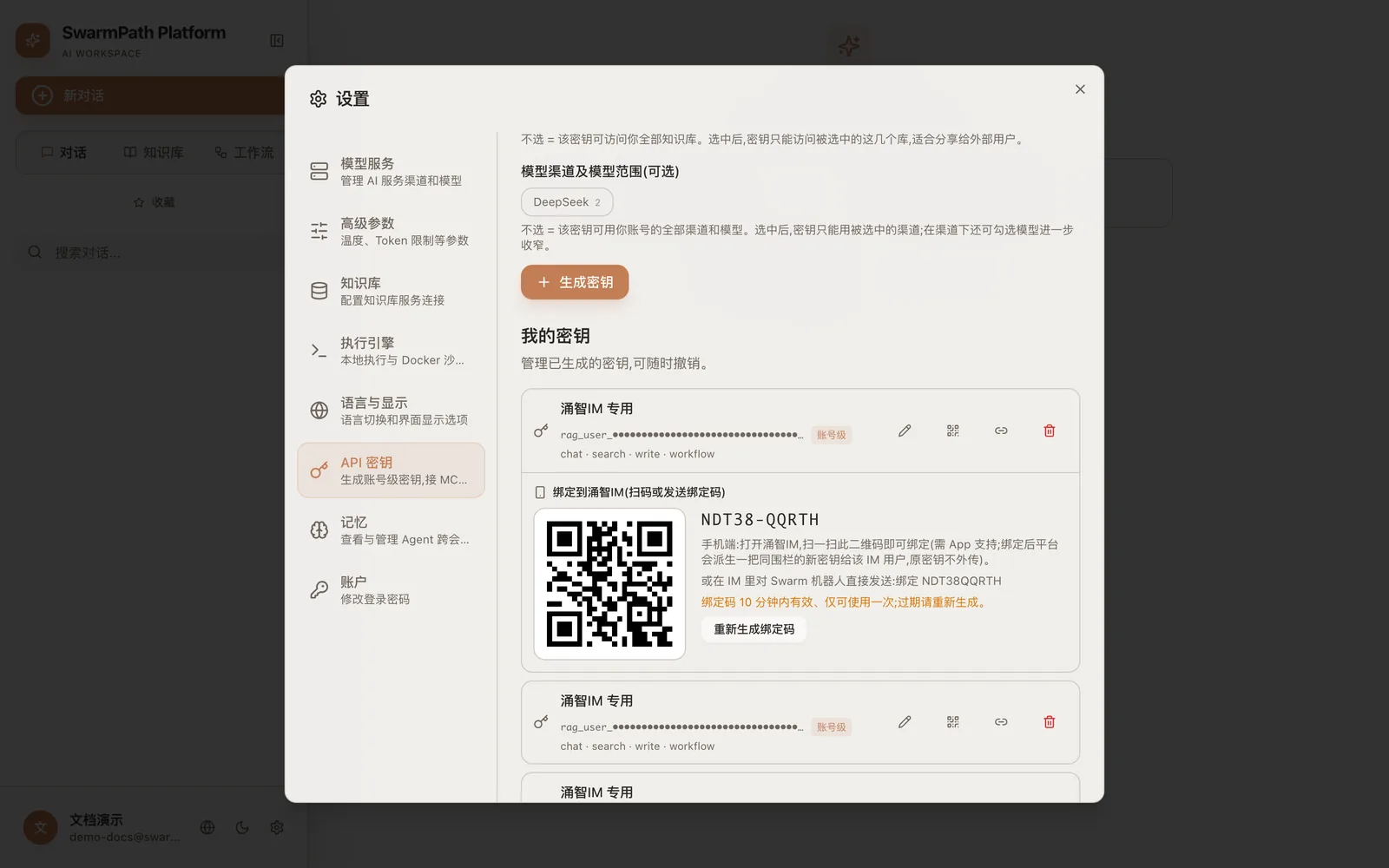 Click the QR icon on a key in "My keys" → a one-time bind code (here
 NDT38-QQRTH) and QR appear; scan it in your IM within 10 minutes
3. Scan it in yongzhi-im
Open yongzhi-im, go to the HiPMMAI bot, and scan the QR (or paste the code). The bot redeems the code with the platform.
4. The platform derives a fenced key
On redemption, the platform:
- creates a new, separate key that clones all the fences of your template key (same permissions, allowed projects, channels, models);
- names it
IM·<your nickname>so you can recognize it; - hands that derived key to the bot. Your template key is never transmitted.
You'll now see "connected IM users" listed under the template key in Settings.
5. Chat
Message the bot in your IM. Your messages are relayed to the platform, answered by your knowledge base and (when appropriate) the agent, and streamed back — including downloadable documents the agent generates.
Unbinding
To disconnect an IM, click the × next to that connection in Settings → API Keys. This revokes only that derived key — your template key and any other IM connections keep working.
Security model
- The IM bot never holds your template key or your platform login. It only ever has a derived key.
- The derived key is fenced to exactly what the template allowed — no more.
- Each connection is independently revocable; killing one doesn't touch the others or the template.
- Binding codes are short-lived (10 min) and single-use, so an intercepted code is useless after it's redeemed or expires.
Troubleshooting
| Symptom | Fix |
|---|---|
| "Code expired / invalid" | Codes last 10 minutes and work once. Generate a fresh QR. |
| Bot replies "no access to that project" | The template key's fences don't include that project. Widen the key's allowedProjects (or use a different key) and re-bind. |
| Want to rotate access | Unbind (×) and generate a new QR — the old derived key stops immediately. |